Start your RC journey with RealFlight Trainer Edition

Learn to fly with the #1 radio-control flight simulation brand in the world. RealFlight Trainer Edition is powered by the industry-leading RealPhysics™ engine, and designed by both full-scale and RC pilots. This unmatched realism makes RealFlight an essential tool for any new RC pilots learning to fly. Hone your skills in RealFlight's True-to-Life digital environment so you can pilot your physical models safely with confidence and style!
Beginner Airplanes and Helicopters Included
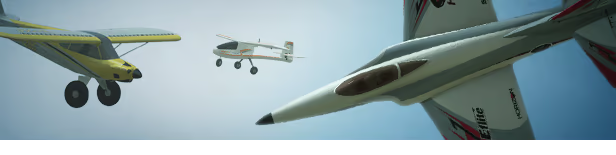 RealFlight Trainer Edition contains 8 essential trainer aircraft from Horizon Hobby. The flight characteristics are meticulously reproduced, and electronic assistance like SAFE, AS3X, and more are included on the simulated airplanes. Practice in the simulator and you’ll be ready to solo the real thing in no time.
Aircraft included:
Blade 230 S V2
Blade 330 S
E-flite Apprentice STS 1.5m
E-flite Habu STS 70mm EDF
HobbyZone Aeroscout S
HobbyZone Apprentice STOL S 700mm
HobbyZone Carbon Cub S+ 1.3m
HobbyZone Sport Cub S
Unlock Additional Content for Free
Gain experience in the form of flight time and RealFlight Trainer Edition will reward you with additional aircraft and airports--for free! The unlockable aircraft are all "Next Step" models, perfect for beginner pilots who have learned to fly with trainer planes/helis and are ready to graduate to their next aircraft. The unlockable airports broaden the range of available environments, including an indoor setting and a float flying site.
Log 2 hours of flight time to earn the following:
Aircraft
Blade 150 S
Blade Eclipse 360
E-flite Conscendo Evolution 1.5m
E-flite Night Radian 2.0m
E-flite Slow Ultra Stick 1.2m
E-flite T-28 Trojan 1.1m
E-flite UMX Conscendo
E-flite UMX Radian
E-flite UMX Slow Ultra Stick
Airports
Alpine Meadow
Athletic Club
Log 4 hours of flight time to earn the following:
Aircraft
Blade Fusion 360
E-flite Commander mPd 1.4m
E-flite Habu SS 50mm EDF
E-flite Habu SS 70mm EDF
E-flite T-28 Trojan 1.2m
E-flite Turbo Timber Evolution 1.5m
E-flite UMX Timber X
E-flite UMX Turbo Timber Evolution
E-flite Valiant 1.3m
Airports
Fly at Eli Field and Carl Henson Field
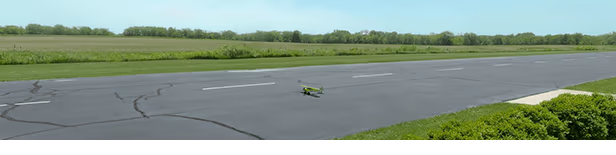 Eli Field is a well-equipped flying field in Monticello, IL. It’s the home flying field for Horizon Hobby, and many of the aircraft in this title were developed there! With side-by-side paved and grass runways, and plenty of open space, it’s the perfect place to learn to fly.
 Carl Henson Field in Eugene, OR is home to the Eugene R/C Aeronauts flying club. Its well-maintained grounds feature a lush grass runway surface that any golf course would envy. This wide-open locale is another great place for beginners to build their skills.
Learn from Experienced RC Pilots
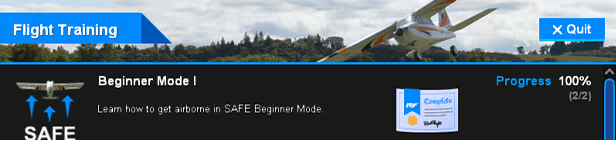 RealFlight's training modules help take the mystery out of flying model aircraft. An experienced pilot talks you through the use of flight assistance features and gives you the knowledge you need to succeed.
Upgrade to RealFlight Evolution
 When you are ready for over 300 more aircraft, more than 75 flying sites, and other features like custom content and the full suite of Challenges, you can upgrade to RealFlight Evolution. A discount is available on the RealFlight Evolution store page.
Controller Required
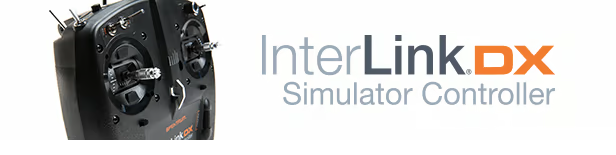 RealFlight requires a controller to run and supports a large number of options:
Option 1 (Recommended): For the best experience, we strongly recommend the Spektrum™ InterLink® DX simulator controller. It is specially designed for RealFlight and all your controls will come pre-configured by default.
Option 2: Use your own RC Radio with an interface. The Spektrum WS2000 wireless dongle works well for this, and there are other 3rd-party wireless interfaces available. (Requires additional user setup.)
Option 3: Use your own RC Radio connected directly via USB. This transmitter feature is becoming more commonplace. (Requires additional user setup.)
Option 4: Use any 4-axis game controller such as a gamepad or an advanced flight stick. (Requires additional user setup.)
*Note: See the Announcements and Community Discussion for purchase links.
