
GameGuru Classic
Анимация и моделированиеДизайн и иллюстрацияОбразованиеРазработка игрУтилитыОбучение работе с ПО
GameGuru Classic is a non-technical and fun game-maker. It allows you to build your own game world, using creative and enjoyable tools. Populate your game by placing down characters, weapons and other game items, then press one button to build your game, ready to play and share.
Выберите регион ВАШЕГО Steam-аккаунта
Способ получения
Издание
Скриншоты
Welcome to GameGuru Classic, game making for everyone. We've created an easy to use and most enjoyable game creator. Join us and our great and enthusiastic game-making community on your journey to make fun games! Imagine creating a world that you and your friends come together and play... and creating it can be a matter of minutes with no technical jiggery-pokery needed at all :-) Of course, you can happily spend hours, days..even weeks creating your masterpiece, the great thing about GameGuru is, you won't be held up by learning strange alien languages or using complex modelling tools. The time you spend with GameGuru Classic is all about creating and having fun whilst doing it.
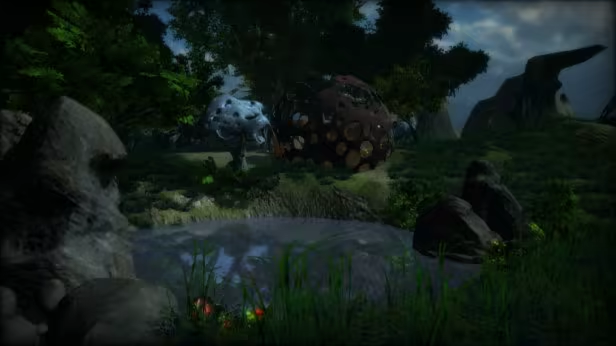
When you first launch GameGuru Classic, it may appear to be a simple level editor, but it's actually crammed with lots of useful tools you will need to make your own game, including a character creator, model importer, building maker, complete scripting language and of course, over 6GB of complimentary game assets to get you started. The fact it's as easy as any in-game level editor is a plus, and unlike level editors, you get to save out what you've made and even sell your game!
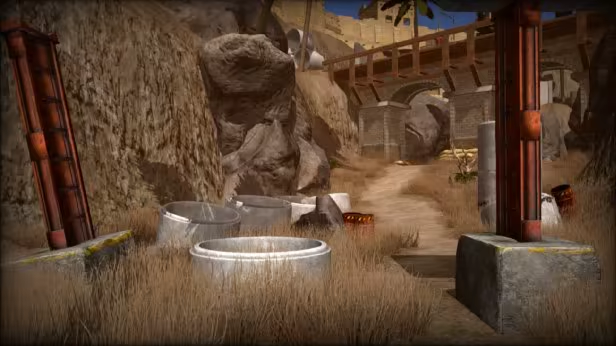
We've created a small game level for you to play and enjoy, which shows you how you might lay out your level, and balance the combat to give the player a challenging experience. You can, of course, edit this level any way you wish and learn from an existing demo level rather than start completely from scratch. We believe there is nothing on the market which enables you to create and share a 3D game as quickly as GameGuru Classic, thanks to a massive starter collection of assets, our easy drag and drop approach and built-in game logic so you don't need to code it yourself (unless you want to).
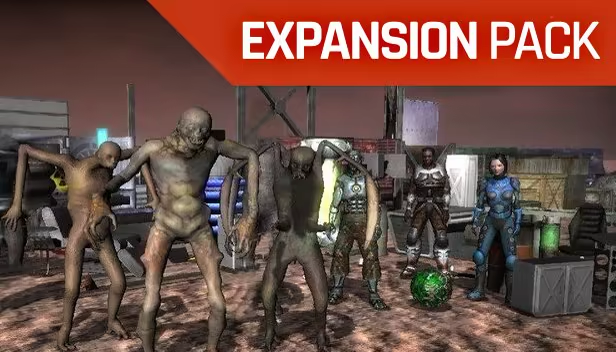
As a welcome bonus, we have also included an expansion pack with over 2.8 GB of additional game assets for you to get started, completely free! In fact, all the art you see in the screenshots above are included in GameGuru Classic and you are free to include them in your games, no strings attached. We do sell additional content DLCs, but with over 6,000 megabytes of game assets already crammed into GameGuru Classic, the DLCs are entirely optional.
GameGuru Classic and its creators
GameGuru Classic has been developed by TheGameCreators. We're a UK-based Indie development team with years of experience. GameGuru Classic has been designed by gamers for gamers and we want to build and design it along with our enthusiastic community.

The Technical Stuff
For those who want to learn more – here are the main elements of GameGuru Classic:
3D Game Engine & Editor
Physics
Game Characters & Weapons
Multiplayer on Steam (GameGuru Classic is required by all users to play multiplayer games)
Build Games
Choosing Your Game Engine
GameGuru Classic is not designed to compete with professional development tools such as Unity, Unreal and Cry-engine which are ideally suited to producing commercial apps and games. GameGuru Classic is a recreational game maker, not a professional tool, and is still very much in development. GameGuru Classic is unsuitable for serious game development projects at this time, and we highly recommend you visit the forums and ask many questions before you make a decision on the game making tool for you.
When you first launch GameGuru Classic, it may appear to be a simple level editor, but it's actually crammed with lots of useful tools you will need to make your own game, including a character creator, model importer, building maker, complete scripting language and of course, over 6GB of complimentary game assets to get you started. The fact it's as easy as any in-game level editor is a plus, and unlike level editors, you get to save out what you've made and even sell your game!
We've created a small game level for you to play and enjoy, which shows you how you might lay out your level, and balance the combat to give the player a challenging experience. You can, of course, edit this level any way you wish and learn from an existing demo level rather than start completely from scratch. We believe there is nothing on the market which enables you to create and share a 3D game as quickly as GameGuru Classic, thanks to a massive starter collection of assets, our easy drag and drop approach and built-in game logic so you don't need to code it yourself (unless you want to).
As a welcome bonus, we have also included an expansion pack with over 2.8 GB of additional game assets for you to get started, completely free! In fact, all the art you see in the screenshots above are included in GameGuru Classic and you are free to include them in your games, no strings attached. We do sell additional content DLCs, but with over 6,000 megabytes of game assets already crammed into GameGuru Classic, the DLCs are entirely optional.
GameGuru Classic and its creators
GameGuru Classic has been developed by TheGameCreators. We're a UK-based Indie development team with years of experience. GameGuru Classic has been designed by gamers for gamers and we want to build and design it along with our enthusiastic community.
The Technical Stuff
For those who want to learn more – here are the main elements of GameGuru Classic:
3D Game Engine & Editor
- Easy to use, drag & drop style
- Birds eye view & 3D fly editing systems
- Game world – Construct levels for your games
- Terrain editor – With easy to use controls you can create unique environments
- Infinite vegetation system – Vegetation is auto-generated, just paint it on the map
- Level of detail – The game engine supports Level Of Detail technology (LOD)
- Cascade shadow mapping – Real-time dynamic sun shadow
- Lightmapping – Add fast shadows to your levels with the shadow baking system
- Sky maps – Choose from a wide range of high-resolution sky maps
- Occlusion Culling System – Fast rendering from a special object culling system
- Light Rays – Let the light flood your game scenes with cool god rays
- Connect to the Asset Store to extend your library of game assets
Physics
- GameGuru Classic uses the Bullet Physics engine to create realistic physics events
- Rag-doll deaths of characters
Game Characters & Weapons
- Customize character in-game properties
- Simple Character Creator
- A.I scripts control characters - Scripts are coded using the LUA language
- GameGuru Classic comes equipped with a range of stock weapons and ammo packs
- Explosive Munitions – RPGs, grenades, and landmines
- Ammo pick-ups – Reload weapons during game-play with ammo pickups
- Jet-pack - A special Jet-pack object lets you fly around your game world
Multiplayer on Steam (GameGuru Classic is required by all users to play multiplayer games)
- Build games with multiplayer features
- Create death-match levels
- Make Team death-match levels
- Build Co-op Multiplayer games
- Up to 8 players can play your game
- Play with friends
Build Games
- Save standalone single player games as executable files
- Distribute your games royalty free
Choosing Your Game Engine
GameGuru Classic is not designed to compete with professional development tools such as Unity, Unreal and Cry-engine which are ideally suited to producing commercial apps and games. GameGuru Classic is a recreational game maker, not a professional tool, and is still very much in development. GameGuru Classic is unsuitable for serious game development projects at this time, and we highly recommend you visit the forums and ask many questions before you make a decision on the game making tool for you.